Crew scheduling for film and TV heads of department
Run your department, not a spreadsheet.
Set Etiquette puts your shoot days, your crew and their timesheets in one place. Book people in a tap, move a day and everything moves with it, and get signed timesheets to payroll on the production's own form before Monday noon.
- Designed by crew who work on set
- Works on any phone, no app to install
- Data stored in the EU
November
Sample data
Sound familiar?
Heads of department carry the whole show. The tools haven't kept up.
- 01
The schedule lives in five places
A whiteboard, a spreadsheet, three WhatsApp groups and your head. Nobody has the full picture but you.
- 02
Every change means ringing round
The unit moves a day and you spend the evening re-booking people and hoping everyone saw the message.
- 03
Who's free on the 14th with prosthetics experience?
Finding the right person for the day means scrolling contacts and texting people one at a time.
- 04
The Monday morning timesheet chase
Photos of paper forms, totals that don't add up, the wrong form for the production, and payroll's noon deadline.
Every department
One tool for the whole crew, not just one team.
Each department runs its own crew list, calendar and timesheets, and tags its people with the skills that matter to it. Then finding the right person for the day takes seconds.
Hair
- Wigs and hairpieces
- Period styling
- Facial hair
Make-up
- Prosthetics
- SFX and blood
- Ageing
Assistant directors
- Base AD
- Floor runner
- Crowd marshalling
Costume
- Breakdown and ageing
- Tailoring
- Armour
Art department
- Scenic painting
- Graphics
- Standby props
Stunts
- Precision driving
- Wirework
- Horse riding
And camera, grips, greens, locations, transport, horses, accounts or any other department: add it in a tap, and add your own skills in your own words.
What it does
Feels like a calendar, not production software.
Fast enough to use between setups. Simple enough that your crew actually use it.
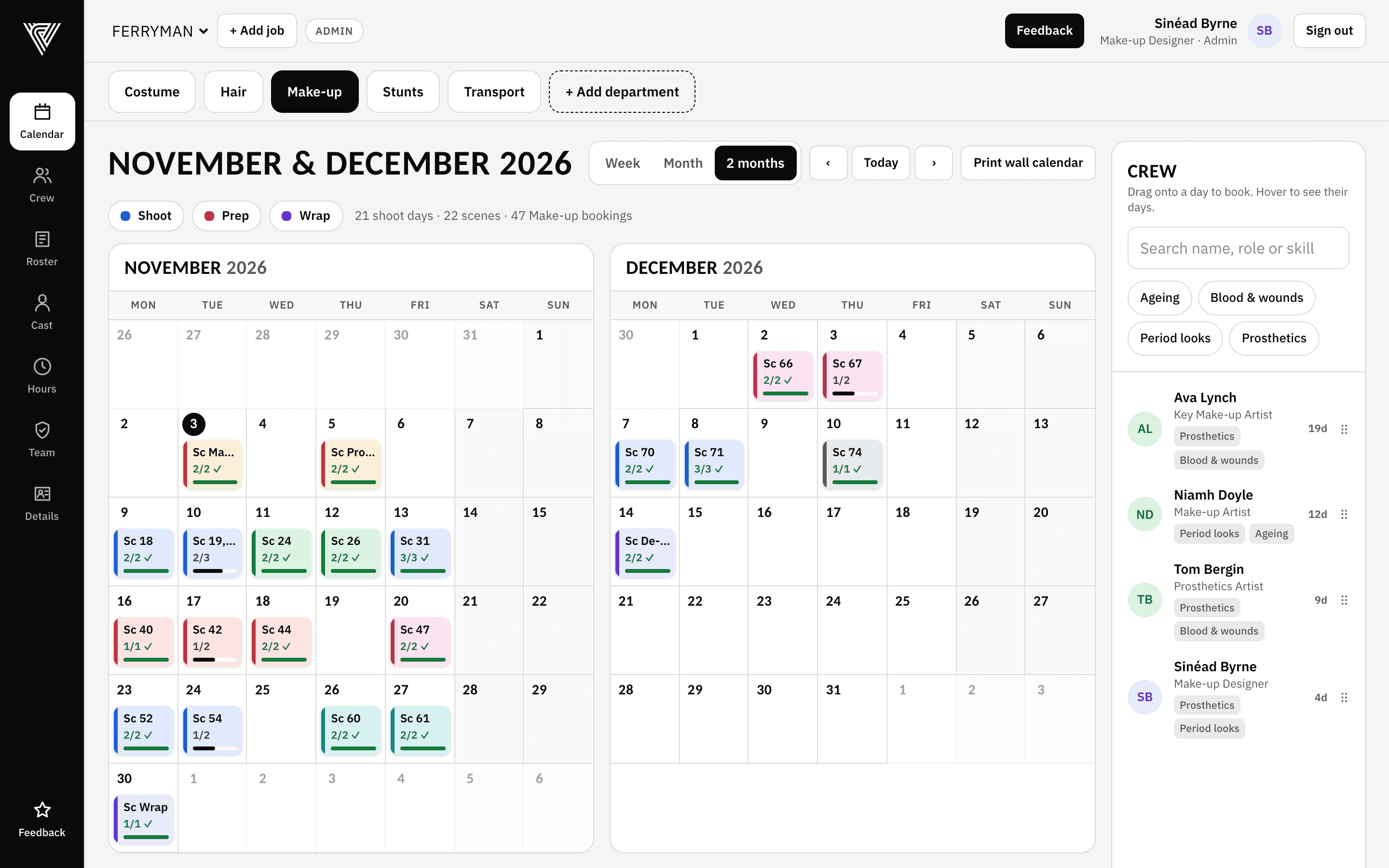
Two months at a glance
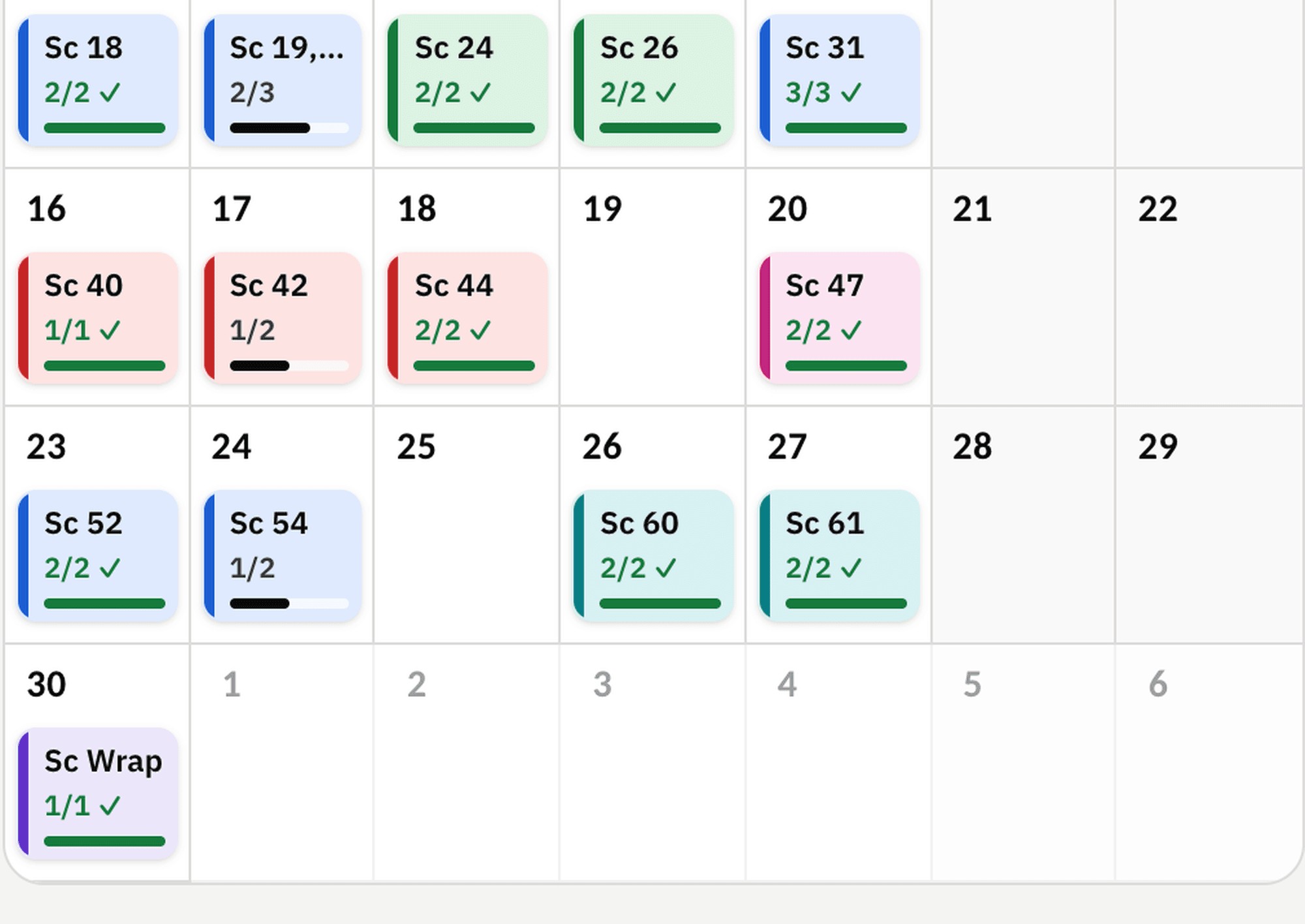
- Shoot, prep and wrap days in their own colours, a choice of colours for shoot days, and how many crew have confirmed on every day.
- Drag a day to a new date and its scenes, crew and bookings move with it, in one step, with undo.
- Each department builds its own calendar, and the production office can share days with the whole unit.
Your crew, your way
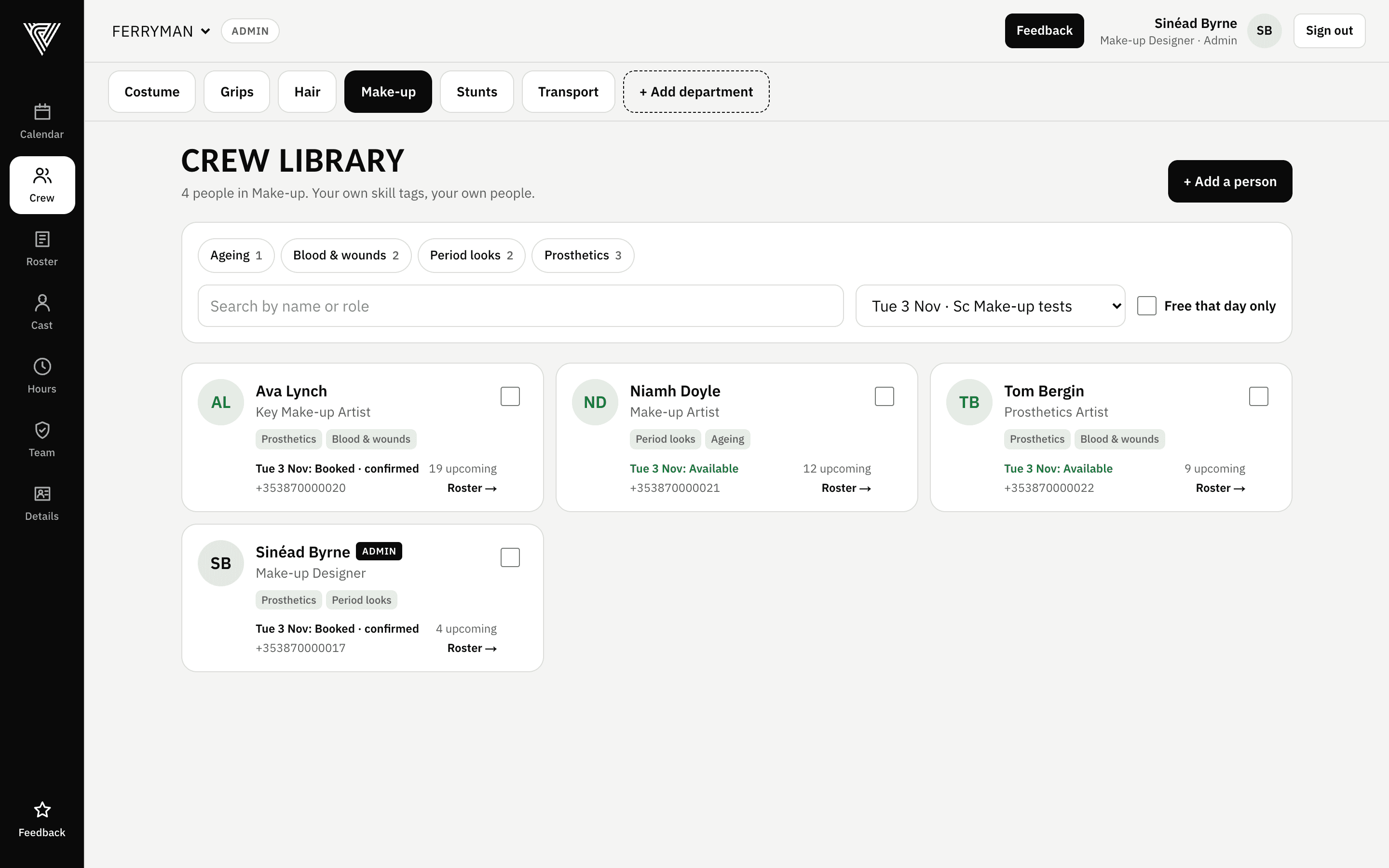
- Your own crew database with skill tags for whatever your department needs: wigs, prosthetics, base AD experience, precision driving.
- Filter by skill and see who's free on a date before you ask anyone.
- Add someone to a day in one or two taps, or drag them straight onto the calendar.
- Bring your whole list in from a spreadsheet in minutes.
- Crew fill in their start form once: address, emergency contact, dietary needs, car registration and loan-out company details. It's there for every production, and only their HOD and the production office can see it.
Every roster, every production
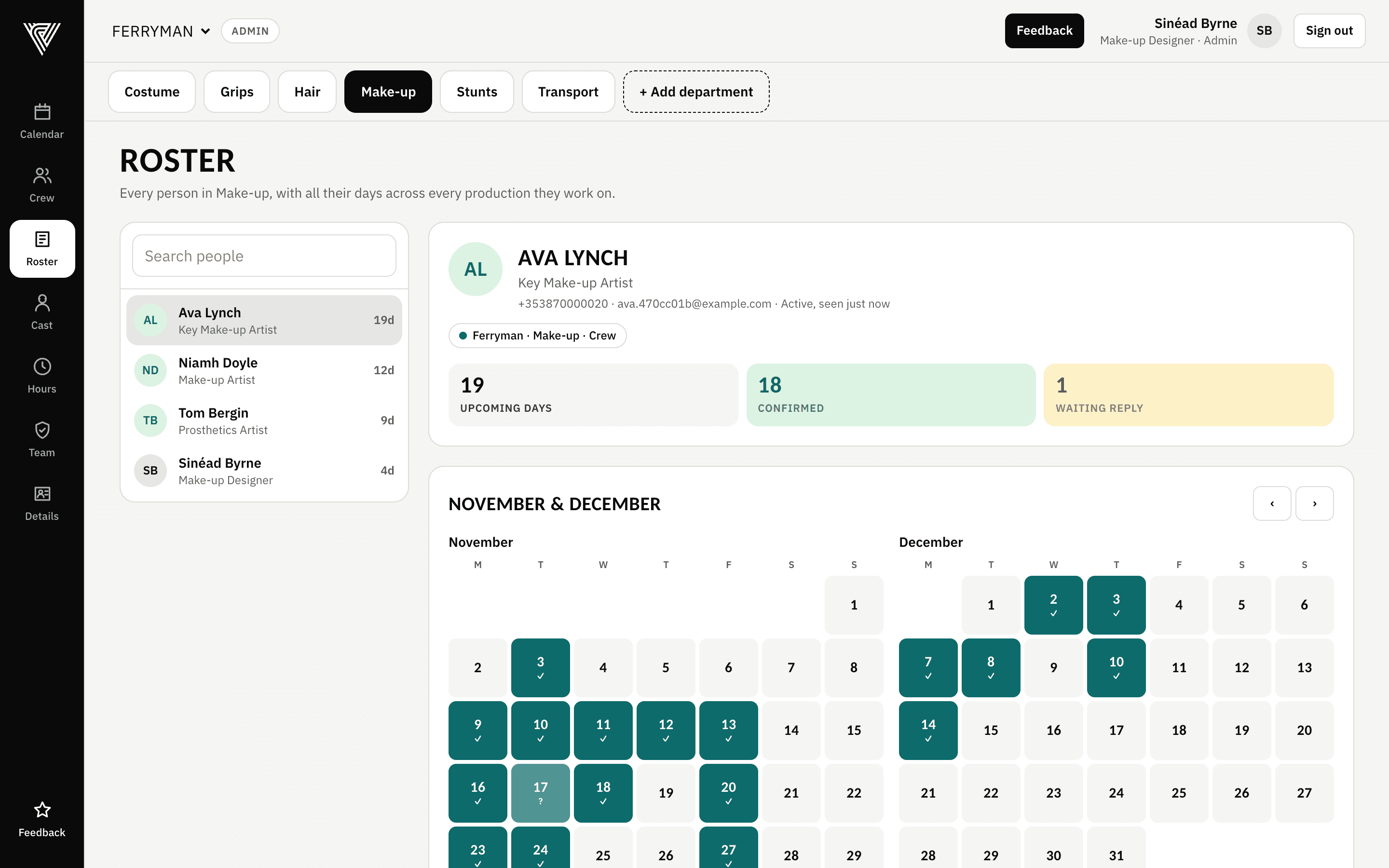
- Each person's days across every production they work on, in one place.
- Confirmed days and days still waiting on a reply, at a glance.
- Crew see their own roster on their phone, and nobody else's.
Timesheets
Signed, checked and with payroll by Monday noon.
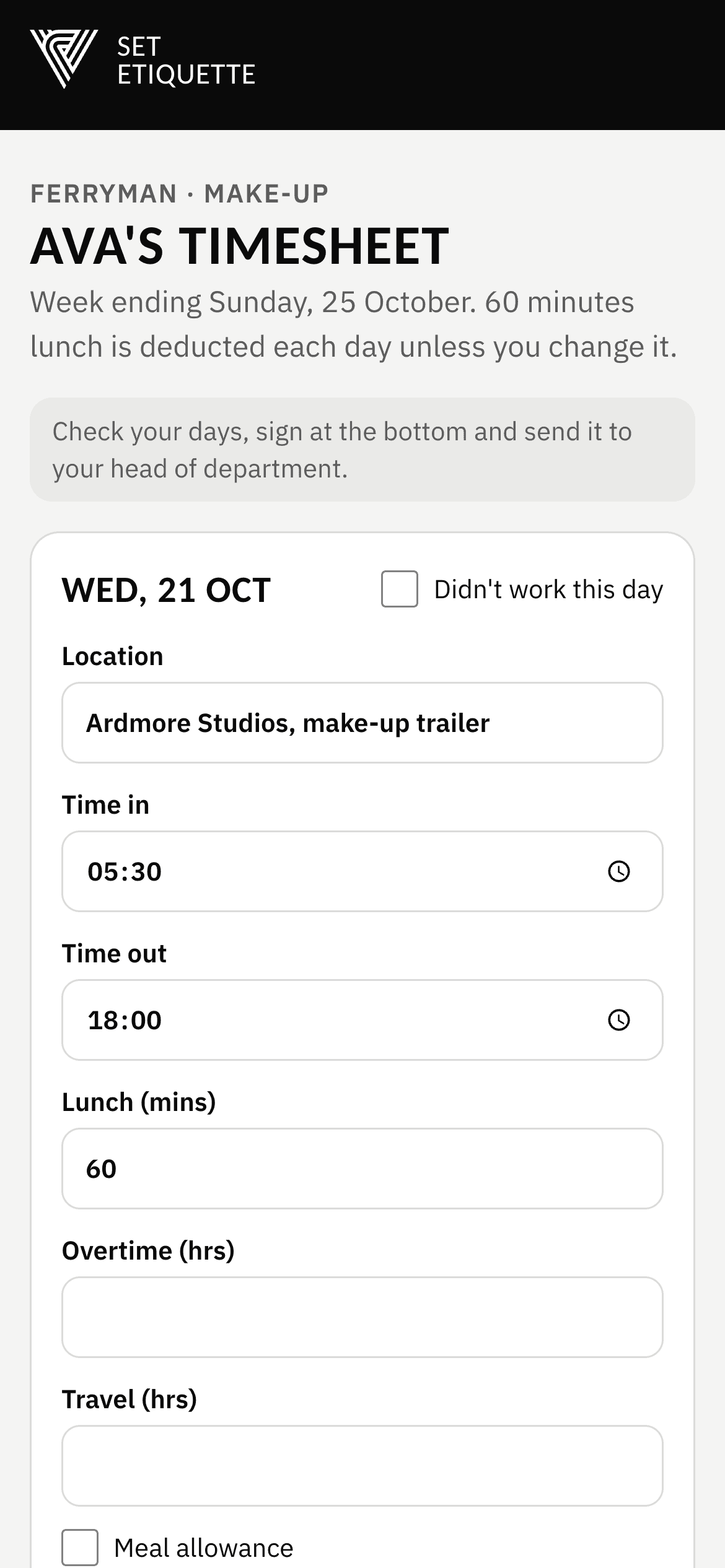
No more filling in timesheets for people, chasing photos of paper forms or retyping hours onto a spreadsheet. Your crew do their own, on their phone, in a couple of minutes.
- 01
Send the links
From the Timesheets screen, send everyone booked that week their own link. By email, or copy it into WhatsApp or a text for anyone without one.
- 02
Crew fill in and sign
Their days are already in from the schedule. They check the times, add overtime or travel, and sign with a finger. No app, no password.
- 03
Checked before it reaches you
Hours add themselves up, lunch is deducted, night shifts past midnight are handled, and missed breaks or short rest are flagged.
- 04
Approve with one signature
Query anything that's off with a note. Approve the rest in one go with your own signature.
- 05
On the production's own form
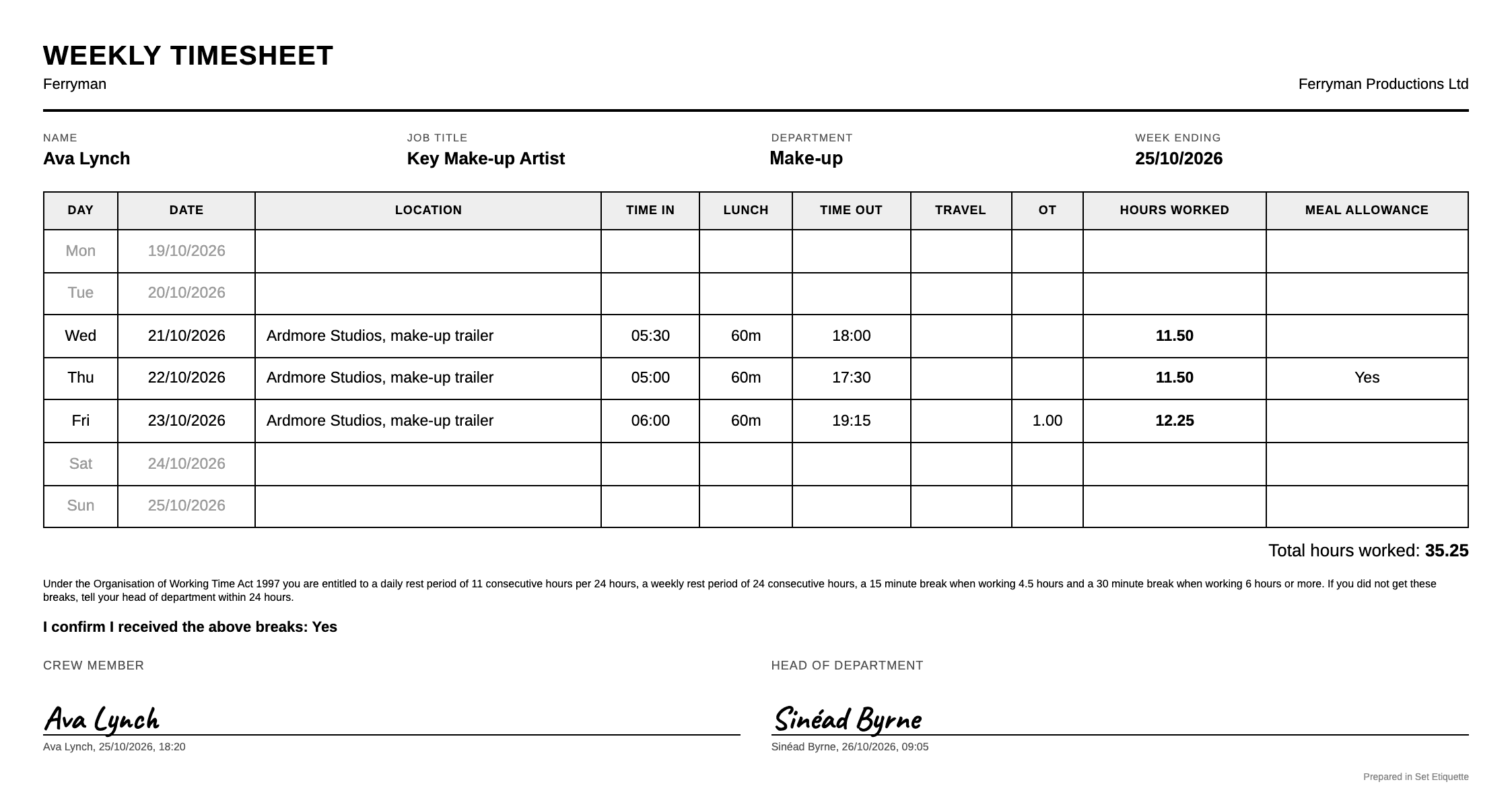
Set Etiquette fills in the production's own timesheet, or a clean standard one, and emails the signed PDF to payroll, the crew member and you.
- 06
Reminders do the chasing
Anyone who hasn't sent theirs gets a reminder on Sunday evening and again on Monday morning. You get a list of who's missing before payroll's noon deadline.
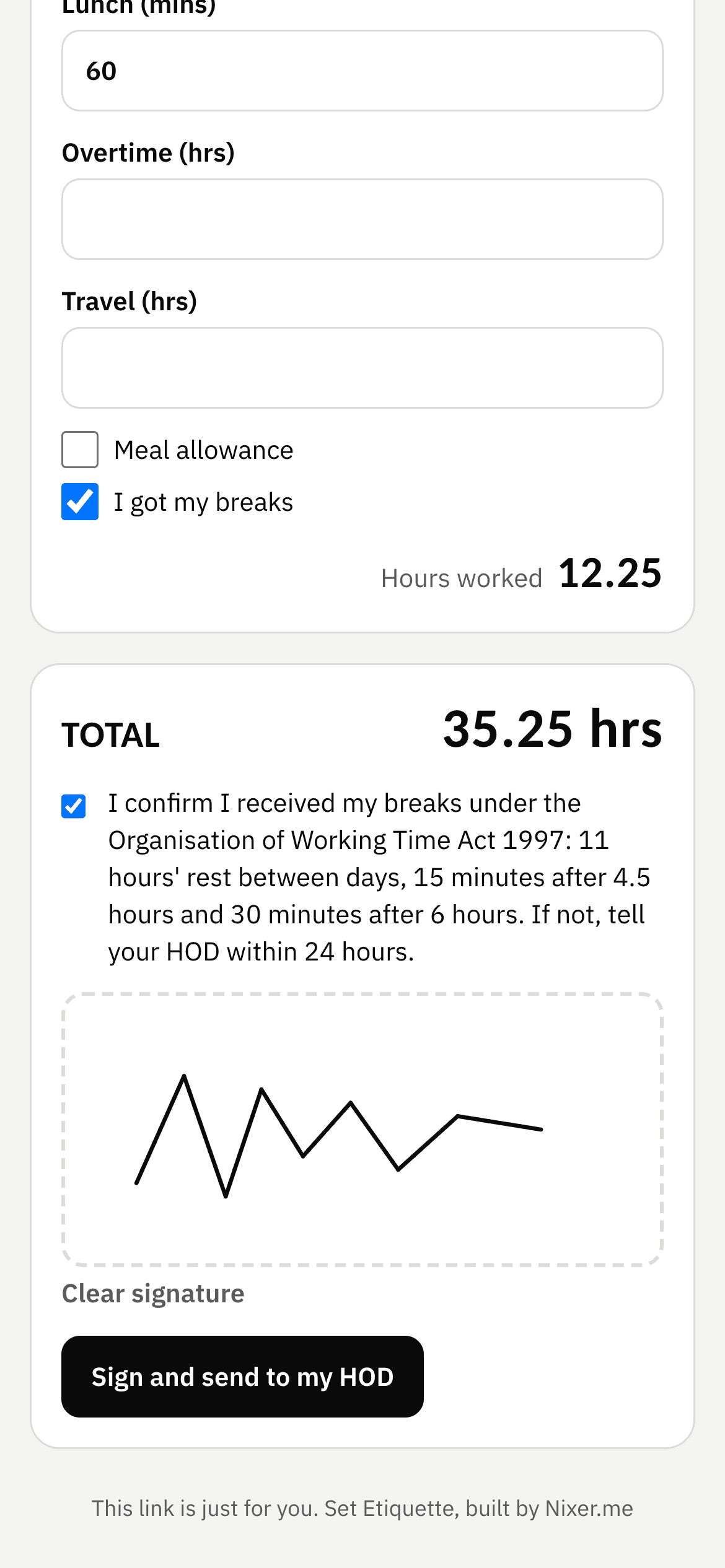
Swipe to see the whole form
Your crew on WhatsApp, without another group chat.
One-to-one messages from your department's own WhatsApp Business number, with email as a backup for anyone who prefers it.
Availability requests
Ask a group if they're free, with your own wording, and see the answers land on the calendar. One tap to reply.
Call sheets and documents
Upload the call sheet, risk assessment or map to a day and everyone booked gets their own link.
Schedule change alerts
When a day moves, or the call time or location changes, the people on it are told automatically.
Who sees what
Everyone gets exactly the right view.
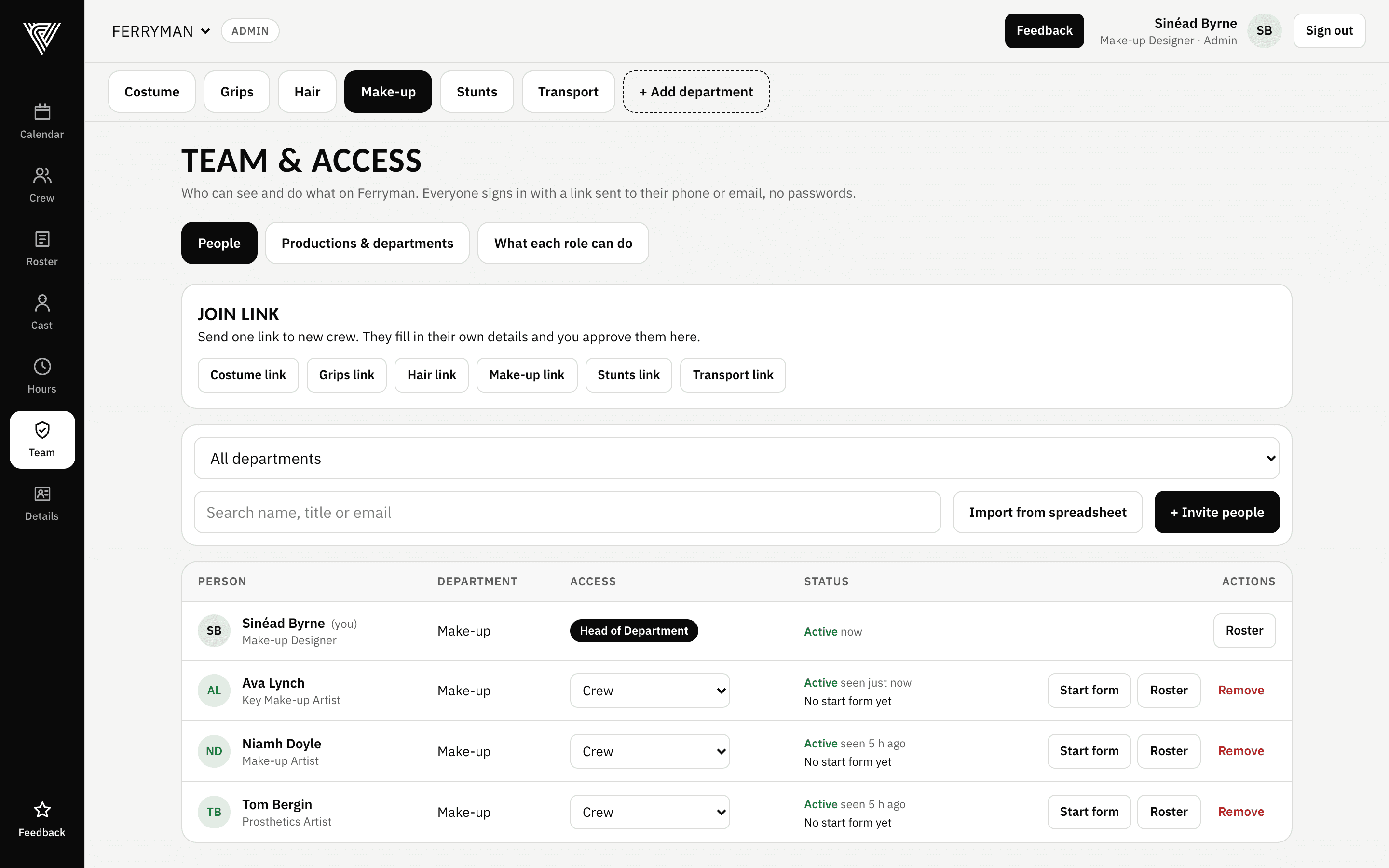
Someone can be a head of department on one production and crew on another. Set Etiquette handles that, and every rule is enforced by the database itself, not just hidden on screen.
Production office
Sets up productions and departments, appoints heads of department, and moves the unit days every department shares.
Head of department
Runs their own department: calendar, crew, bookings, timesheet approval. Adds and removes their own crew.
Assistant HOD
Helps run the department day to day. Books crew and chases timesheets, but can't approve them or change access.
Crew
Sees their own roster across productions, keeps their own start form up to date, and fills in their own timesheet. Nothing else.
Security
Crew phone numbers and confidential schedules, treated that way.
Stored in the EU
Your crew, schedules and timesheets live in a professional database in Ireland, with daily backups.
No passwords to lose
Everyone signs in with a secure link sent to their email. Timesheet links work for one person and one week only.
Two-step verification
Admins and heads of department, who can see everyone's details and sign off timesheets, confirm it's them with a code from their phone.
Access enforced at the source
Crew can't see each other's rosters or details, or other departments' plans, and every rule is checked by automated security tests before each update.
A record of every change
Who moved, booked or approved what, and when, so there's an answer if anyone ever asks.
Your data, your company
Each company's data is kept completely separate. Nothing is sold or shared.
Built on set
Built from the front line, for every department.
Set Etiquette was started by Jack Brennan, a stunt performer working on the front line of film and TV productions in Ireland. He's lost days on set to admin problems first hand, and has a real interest in making the paperwork side of filming simpler for everyone.
Set Etiquette is the result: one place for the schedule, the crew and their timesheets, quick enough to use between setups and simple enough that crew use it without being shown twice. It works the same way for every department, from hair, make-up and costume to ADs, art, grips and stunts.
Questions
Good questions
Do my crew need to download an app?
No. Set Etiquette works in any phone's web browser. Crew tap the link they're sent and they're in. Timesheet links don't even need a sign-in.
Is it just for one department?
No. Every department can use it: hair, make-up, costume, ADs, art, camera, grips, greens, locations, transport, accounts, stunts, horses and more. Each department keeps its own crew, skills and calendar, and the production office can add as many departments as it needs.
Can crew see each other's rosters?
No. Crew see their own days, on every production they work on. The HOD and the production office see the department's rosters. Nobody else's phone number or email is shown to crew.
Do crew have to type the same details in for every job?
No. Each person keeps their details in one place, on their phone, including loan-out company details, and they carry over to every production they work on. Their HOD and the production office can see them; other crew can't. PPS numbers and bank details aren't kept here.
Does it work out pay?
No. Set Etiquette records hours, overtime, travel and meal allowances, and sends signed timesheets to payroll. Rates and pay stay with payroll, as they do now.
What about crew who don't use email?
Add them with just a mobile number. Copy their timesheet link from the app into WhatsApp or a text and they fill it in the same way.
Our production has its own timesheet form. Can it use that?
Yes. Set Etiquette fills in the production's own form so payroll get exactly what they ask for. We add new forms as you start working with new productions.
Can it handle more than one job at once?
Yes. Add a job in a couple of taps and switch between them. Each one has its own calendar, crew and timesheet form, and each person's roster pulls their days from every job they're on.
How do we get started?
Book a demo. We'll load your crew from a spreadsheet, set up your production and departments, and walk you and your team through it.
Book a demo
See it with your own crew.
Tell us a little about your department and Jack will show you Set Etiquette, set up the way you work. Usually half an hour, on a call or in person.
- Your crew loaded from your spreadsheet
- Your production's timesheet form set up
- Your team walked through it